Identify areas for review
Where supported, automated tools can flag candidate anomalies for closer inspection. Agree which conditions the selected software is designed to identify before using its results.

AI-Assisted Inspection
Connect candidate findings with captured evidence and professional review. For MX-100 projects, confirm the available AI tools, supported defect classes, and validation for the selected software configuration.
Evidence and review
Where supported, automated tools can flag candidate anomalies for closer inspection. Agree which conditions the selected software is designed to identify before using its results.
Retain the relevant image or model view alongside each finding. Record the location, reviewer notes, and measurements required by the inspection procedure.
A qualified reviewer assesses the evidence, resolves ambiguous cases, and determines which findings belong in the final inspection record.
Confirm feature availability, licensing, defect categories, and reporting fields for the supplied configuration. A sample reconstruction alone does not establish detection performance.
How it works
Collect interior imagery and scan data with the MX-100.
Process the recording into the available spatial and visual outputs.
Assess candidate findings against the images, geometry, and site context.
Record confirmed observations and supporting evidence in the report.
This describes an inspection review workflow. Automated detection availability and scope depend on the selected software.
In practice
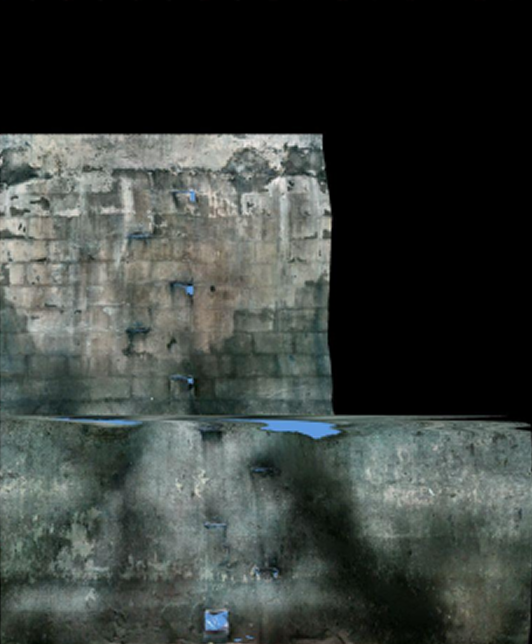
An unwrapped wall image helps a reviewer examine the interior surface and relate observations to the inspection record. The MX-100 page also shows imagery, mesh, point-cloud, and report examples.
Practical evaluation
The sample is an MX-100 BAG source recording. Confirm processing software access, licensing, and any AI features with ModeXion. Review the MX-100 sample →
Detection categories and performance depend on the software configuration and validation. Ask for a demonstration using examples of the conditions your team needs to assess.
Geometry and wall imagery provide complementary views for documenting observations and reviewing measurements. Understand point clouds and models →